
01 入门
1. Nginx
参考文件 https://dunwu.github.io/nginx-tutorial/#/nginx-quickstart?id=%e7%bd%91%e7%ab%99%e6%9c%89%e5%a4%9a%e4%b8%aa-webapp-%e7%9a%84%e9%85%8d%e7%bd%ae
https://zhuanlan.zhihu.com/p/389438482
Nginx是什么
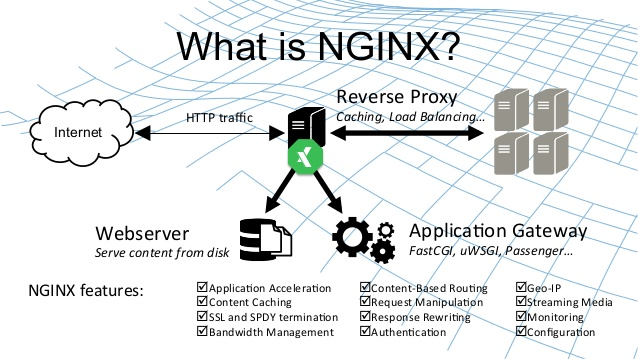
Nginx (engine x) 是一款轻量级的 Web 服务器 、反向代理服务器、负载均衡及电子邮件(IMAP/POP3)代理服务器。
Nginx本身也是一个静态资源的服务器,当只有静态资源的时候,就可以使用Nginx来做服务器,如果一个网站只是静态页面的话,那么就可以通过这种方式来实现部署。
特点:轻量级、高性能、稳定性高、并发性好
mac上安装Nginx
- 安装命令
1 | brew install nginx |
- 启动nginx服务
1 | brew services start nginx |
- 在mac上nginx的配置目录
1 | ``` |
nginx -s stop 快速关闭Nginx,可能不保存相关信息,并迅速终止web服务。
nginx -s quit 平稳关闭Nginx,保存相关信息,有安排的结束web服务。
nginx -s reload 因改变了Nginx相关配置,需要重新加载配置而重载。
nginx -s reopen 重新打开日志文件。
nginx -c filename 为 Nginx 指定一个配置文件,来代替缺省的。
nginx -t 不运行,仅仅测试配置文件。nginx 将检查配置文件的语法的正确性,并尝试打开配置文件中所引用到的文件。
nginx -v 显示 nginx 的版本。
nginx -V 显示 nginx 的版本,编译器版本和配置参数。
1 |
|
location = / {
# 精确匹配/,主机名后面不能带任何字符串 /
[ configuration A ]
}
location / {
# 匹配所有以 / 开头的请求。
# 但是如果有更长的同类型的表达式,则选择更长的表达式。
# 如果有正则表达式可以匹配,则优先匹配正则表达式。
[ configuration B ]
}
location /documents/ {
# 匹配所有以 /documents/ 开头的请求,匹配符合以后,还要继续往下搜索。
# 但是如果有更长的同类型的表达式,则选择更长的表达式。
# 如果有正则表达式可以匹配,则优先匹配正则表达式。
[ configuration C ]
}
location ^~ /images/ {
# 匹配所有以 /images/ 开头的表达式,如果匹配成功,则停止匹配查找,停止搜索。
# 所以,即便有符合的正则表达式location,也不会被使用
[ configuration D ]
}
location ~* .(gif|jpg|jpeg)$ {
# 匹配所有以 gif jpg jpeg结尾的请求。
# 但是 以 /images/开头的请求,将使用 Configuration D,D具有更高的优先级
[ configuration E ]
}
location /images/ {
# 字符匹配到 /images/,还会继续往下搜索
[ configuration F ]
}
location = /test.htm {
root /usr/local/var/www/htm;
index index.htm;
}
1 | 注意:location的优先级与location配置的位置无关 |
location /permanently/moved/url {
return 301 http://www.example.com/moved/here;
}
1 |
|
location /users/ {
rewrite ^/users/(.*)$ /show?user=$1 break;
}
1 | 1. error_page指令 |
error_page 404 /404.html;
1 |
|
log_format main ‘$remote_addr - $remote_user [$time_local] “$request” ‘
‘$status $body_bytes_sent “$http_referer” ‘
‘“$http_user_agent” “$http_x_forwarded_for”‘;
access_log /usr/local/etc/nginx/logs/host.access.log main;
gzip on;
1 |
|
禁止访问某个目录
location ~* .(txt|doc)${
root $doc_root;
deny all;
}
1 |
|
#运行用户
#user somebody;
#启动进程,通常设置成和cpu的数量相等
worker_processes 1;
#全局错误日志
error_log D:/Tools/nginx-1.10.1/logs/error.log;
error_log D:/Tools/nginx-1.10.1/logs/notice.log notice;
error_log D:/Tools/nginx-1.10.1/logs/info.log info;
#PID文件,记录当前启动的nginx的进程ID
pid D:/Tools/nginx-1.10.1/logs/nginx.pid;
#工作模式及连接数上限
events {
worker_connections 1024; #单个后台worker process进程的最大并发链接数
}
#设定http服务器,利用它的反向代理功能提供负载均衡支持
http {
#设定mime类型(邮件支持类型),类型由mime.types文件定义
include D:/Tools/nginx-1.10.1/conf/mime.types;
default_type application/octet-stream;
#设定日志
log_format  main  '[$remote_addr] - [$remote_user] [$time_local] "$request" '
                  '$status $body_bytes_sent "$http_referer" '
                  '"$http_user_agent" "$http_x_forwarded_for"';

access_log    D:/Tools/nginx-1.10.1/logs/access.log main;
rewrite_log     on;

#sendfile 指令指定 nginx 是否调用 sendfile 函数(zero copy 方式)来输出文件,对于普通应用,
#必须设为 on,如果用来进行下载等应用磁盘IO重负载应用,可设置为 off,以平衡磁盘与网络I/O处理速度,降低系统的uptime.
sendfile        on;
#tcp_nopush     on;

#连接超时时间
keepalive_timeout  120;
tcp_nodelay        on;

#gzip压缩开关
#gzip  on;

#设定实际的服务器列表
upstream zp_server1{
    server 127.0.0.1:8089;
}

#HTTP服务器
server {
    #监听80端口,80端口是知名端口号,用于HTTP协议
    listen       80;

    #定义使用www.xx.com访问
    server_name  www.helloworld.com;

    #首页
    index index.html

    #指向webapp的目录
    root D:\01_Workspace\Project\github\zp\SpringNotes\spring-security\spring-shiro\src\main\webapp;

    #编码格式
    charset utf-8;

    #代理配置参数
    proxy_connect_timeout 180;
    proxy_send_timeout 180;
    proxy_read_timeout 180;
    proxy_set_header Host $host;
    proxy_set_header X-Forwarder-For $remote_addr;

    #反向代理的路径(和upstream绑定),location 后面设置映射的路径
    location / {
        proxy_pass http://zp_server1;
    }

    #静态文件,nginx自己处理
    location ~ ^/(images|javascript|js|css|flash|media|static)/ {
        root D:\01_Workspace\Project\github\zp\SpringNotes\spring-security\spring-shiro\src\main\webapp\views;
        #过期30天,静态文件不怎么更新,过期可以设大一点,如果频繁更新,则可以设置得小一点。
        expires 30d;
    }

    #设定查看Nginx状态的地址
    location /NginxStatus {
        stub_status           on;
        access_log            on;
        auth_basic            "NginxStatus";
        auth_basic_user_file  conf/htpasswd;
    }

    #禁止访问 .htxxx 文件
    location ~ /\.ht {
        deny all;
    }

    #错误处理页面(可选择性配置)
    #error_page   404              /404.html;
    #error_page   500 502 503 504  /50x.html;
    #location = /50x.html {
    #    root   html;
    #}
}
}
1 |
|
127.0.0.1 www.helloworld.com
1 | 3. 启动前文中 startup.bat 的命令 |
#HTTP服务器
server {
#监听443端口。443为知名端口号,主要用于HTTPS协议
listen 443 ssl;
  #定义使用www.xx.com访问
  server_name  www.helloworld.com;

  #ssl证书文件位置(常见证书文件格式为:crt/pem)
  ssl_certificate      cert.pem;
  #ssl证书key位置
  ssl_certificate_key  cert.key;

  #ssl配置参数(选择性配置)
  ssl_session_cache    shared:SSL:1m;
  ssl_session_timeout  5m;
  #数字签名,此处使用MD5
  ssl_ciphers  HIGH:!aNULL:!MD5;
  ssl_prefer_server_ciphers  on;

  location / {
      root   /root;
      index  index.html index.htm;
  }
}
1 |
|
http {
#设定mime类型,类型由mime.type文件定义
include /etc/nginx/mime.types;
default_type application/octet-stream;
#设定日志格式
access_log /var/log/nginx/access.log;
#设定负载均衡的服务器列表
upstream load_balance_server {
    #weigth参数表示权值,权值越高被分配到的几率越大
    server 192.168.1.11:80   weight=5;
    server 192.168.1.12:80   weight=1;
    server 192.168.1.13:80   weight=6;
}
#HTTP服务器
server {
#侦听80端口
listen 80;
    #定义使用www.xx.com访问
    server_name  www.helloworld.com;

    #对所有请求进行负载均衡请求
    location / {
        root        /root;                 #定义服务器的默认网站根目录位置
        index       index.html index.htm;  #定义首页索引文件的名称
        proxy_pass  http://load_balance_server ;#请求转向load_balance_server 定义的服务器列表

        #以下是一些反向代理的配置(可选择性配置)
        #proxy_redirect off;
        proxy_set_header Host $host;
        proxy_set_header X-Real-IP $remote_addr;
        #后端的Web服务器可以通过X-Forwarded-For获取用户真实IP
        proxy_set_header X-Forwarded-For $remote_addr;
        proxy_connect_timeout 90;          #nginx跟后端服务器连接超时时间(代理连接超时)
        proxy_send_timeout 90;             #后端服务器数据回传时间(代理发送超时)
        proxy_read_timeout 90;             #连接成功后,后端服务器响应时间(代理接收超时)
        proxy_buffer_size 4k;              #设置代理服务器(nginx)保存用户头信息的缓冲区大小
        proxy_buffers 4 32k;               #proxy_buffers缓冲区,网页平均在32k以下的话,这样设置
        proxy_busy_buffers_size 64k;       #高负荷下缓冲大小(proxy_buffers*2)
        proxy_temp_file_write_size 64k;    #设定缓存文件夹大小,大于这个值,将从upstream服务器传

        client_max_body_size 10m;          #允许客户端请求的最大单文件字节数
        client_body_buffer_size 128k;      #缓冲区代理缓冲用户端请求的最大字节数
    }
}
}
1 |
|
upstream bck_testing_01 {
默认所有服务器权重为 1
server 192.168.250.220:8080
server 192.168.250.221:8080
server 192.168.250.222:8080
}
1 | ### 加权轮询 |
upstream bck_testing_01 {
server 192.168.250.220:8080 weight=3
server 192.168.250.221:8080 # default weight=1
server 192.168.250.222:8080 # default weight=1
}
1 | ### 最少连接 |
upstream bck_testing_01 {
least_conn;
with default weight for all (weight=1)
server 192.168.250.220:8080
server 192.168.250.221:8080
server 192.168.250.222:8080
}
1 | ### 加权最少连接 |
upstream bck_testing_01 {
least_conn;
server 192.168.250.220:8080 weight=3
server 192.168.250.221:8080 # default weight=1
server 192.168.250.222:8080 # default weight=1
}
1 | ### IP Hash |
upstream bck_testing_01 {
ip_hash;
with default weight for all (weight=1)
server 192.168.250.220:8080
server 192.168.250.221:8080
server 192.168.250.222:8080
}
1 | #### 普通 Hash |
upstream bck_testing_01 {
hash $request_uri;
with default weight for all (weight=1)
server 192.168.250.220:8080
server 192.168.250.221:8080
server 192.168.250.222:8080
}
1 |
|
http {
#此处省略一些基本配置
upstream product_server{
    server www.helloworld.com:8081;
}

upstream admin_server{
    server www.helloworld.com:8082;
}

upstream finance_server{
    server www.helloworld.com:8083;
}

server {
    #此处省略一些基本配置
    #默认指向product的server
    location / {
        proxy_pass http://product_server;
    }

    location /product/{
        proxy_pass http://product_server;
    }

    location /admin/ {
        proxy_pass http://admin_server;
    }

    location /finance/ {
        proxy_pass http://finance_server;
    }
}
}
1 |
|
worker_processes 1;
events {
worker_connections 1024;
}
http {
include mime.types;
default_type application/octet-stream;
sendfile on;
keepalive_timeout 65;
gzip on;
gzip_types text/plain application/x-javascript text/css application/xml text/javascript application/javascript image/jpeg image/gif image/png;
gzip_vary on;

server {
    listen       80;
    server_name  static.zp.cn;

    location / {
        root /app/dist;
        index index.html;
        #转发任何请求到 index.html
    }
}
}
1 | 然后,添加 HOST: |
127.0.0.1 static.zp.cn
此时,在本地浏览器访问 static.zp.cn ,就可以访问静态站点了。




