1 概述
本质上配置的Build标签是对超级POM配置的Build标签的叠加。(猜想 sofaboot的目录结构也是通过build标签定义了约定的目录结构。)
2 作用
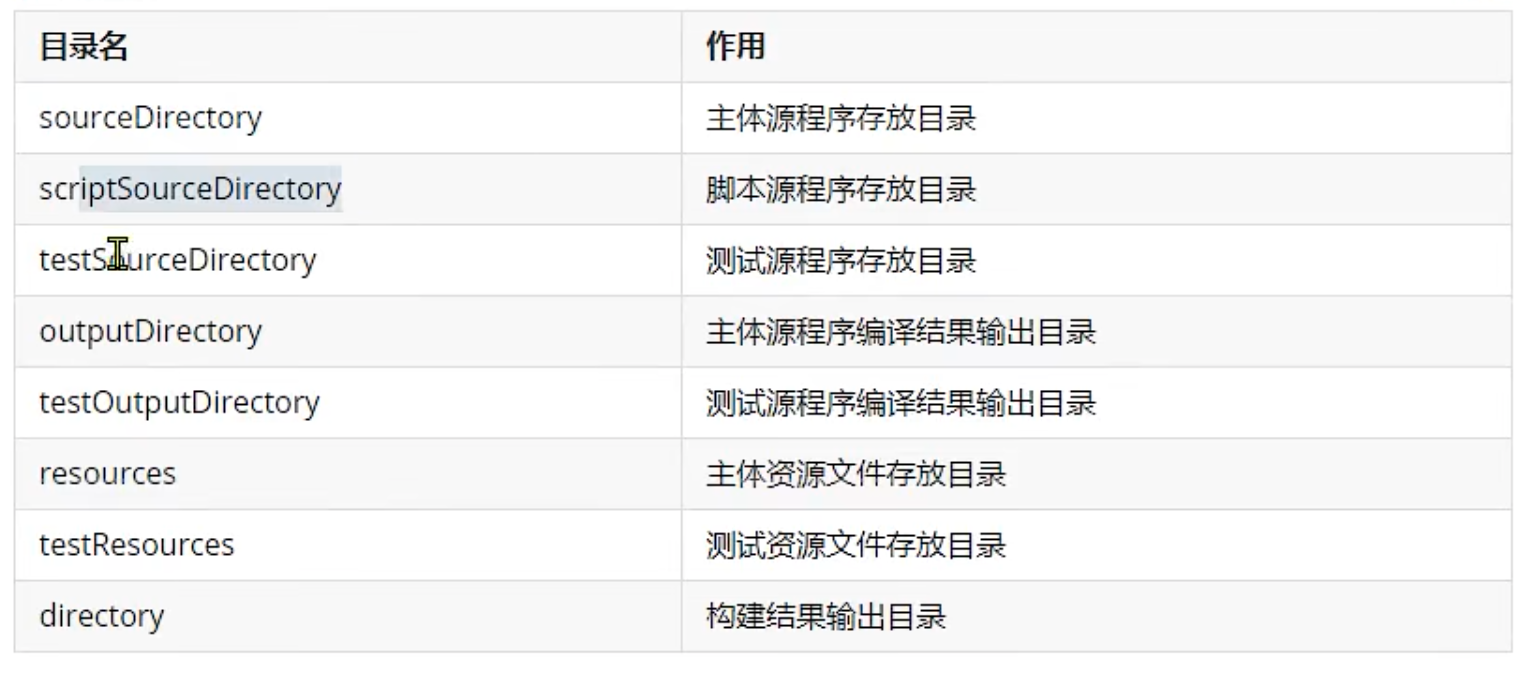
配置约定的目录结构Dir
1
2
3
4
5
6
7
8
9
10
11
12
13
14
15
16
17
18
19
| <build>
<sourceDirectory>/Users/yinkanglong/work/notes/maven/maven源码/project03-maven-test/src/main/java</sourceDirectory>
<scriptSourceDirectory>/Users/yinkanglong/work/notes/maven/maven源码/project03-maven-test/src/main/scripts</scriptSourceDirectory>
<testSourceDirectory>/Users/yinkanglong/work/notes/maven/maven源码/project03-maven-test/src/test/java</testSourceDirectory>
<outputDirectory>/Users/yinkanglong/work/notes/maven/maven源码/project03-maven-test/target/classes</outputDirectory>
<testOutputDirectory>/Users/yinkanglong/work/notes/maven/maven源码/project03-maven-test/target/test-classes</testOutputDirectory>
<resources>
<resource>
<directory>/Users/yinkanglong/work/notes/maven/maven源码/project03-maven-test/src/main/resources</directory>
</resource>
</resources>
<testResources>
<testResource>
<directory>/Users/yinkanglong/work/notes/maven/maven源码/project03-maven-test/src/test/resources</directory>
</testResource>
</testResources>
<directory>/Users/yinkanglong/work/notes/maven/maven源码/project03-maven-test/target</directory>
<finalName>project03-maven-test-0.0.1-snapshot</finalName>
|
备用插件管理pluginManagement
pluginManagement标签存放着多个插件
- maven-antrun-plugin
- maven-assembly-plugin
- mavne-dependency-plugin
- maven-release-plugin
通过pluginMangement标签管理起来的插件,和dependencyManagement一样。子工程使用时可以忽略版本号,在父工程中统一管理版本。父子工程仍旧能够起到版本管理的作用。
- spring-boot-dependencies管理的插件信息
1
2
3
4
5
6
7
8
9
10
11
12
13
14
15
16
17
18
19
| <build>
<pluginManagement>
<plugins>
<plugin>
<groupId>org.codehaus.mojo</groupId>
<artifactId>build-helper-maven-plugin</artifactId>
<version>${build-helper-maven-plugin.version}</version>
</plugin>
<plugin>
<groupId>org.flywaydb</groupId>
<artifactId>flyway-maven-plugin</artifactId>
<version>${flyway.version}</version>
</plugin>
<plugin>
<groupId>pl.project13.maven</groupId>
<artifactId>git-commit-id-plugin</artifactId>
<version>${git-commit-id-plugin.version}</version>
</plugin>
<plugin>
|
生命周期插件plugins
plugins 标签存放的是默认生命周期中实际会用到的插件。这是正式使用的插件。正如dependencyManagement一样,是备用的依赖。
1
2
3
4
5
6
7
8
9
10
11
12
13
14
15
16
17
18
19
20
21
22
23
24
25
26
27
28
29
30
31
32
33
34
35
36
37
38
39
40
41
42
43
44
45
46
47
48
49
50
51
52
53
54
55
56
57
58
59
60
61
62
63
64
65
66
67
68
69
70
71
72
73
74
75
76
77
78
79
80
81
82
83
84
85
86
87
88
89
90
| <build>
<plugins>
<plugin>
<artifactId>maven-clean-plugin</artifactId>
<version>3.1.0</version>
<executions>
<execution>
<id>default-clean</id>
<phase>clean</phase>
<goals>
<goal>clean</goal>
</goals>
</execution>
</executions>
</plugin>
<plugin>
<artifactId>maven-install-plugin</artifactId>
<version>2.5.2</version>
<executions>
<execution>
<id>default-install</id>
<phase>install</phase>
<goals>
<goal>install</goal>
</goals>
</execution>
</executions>
</plugin>
<plugin>
<artifactId>maven-deploy-plugin</artifactId>
<version>2.8.2</version>
<executions>
<execution>
<id>default-deploy</id>
<phase>deploy</phase>
<goals>
<goal>deploy</goal>
</goals>
</execution>
</executions>
</plugin>
<plugin>
<artifactId>maven-site-plugin</artifactId>
<version>3.3</version>
<executions>
<execution>
<id>default-site</id>
<phase>site</phase>
<goals>
<goal>site</goal>
</goals>
<configuration>
<outputDirectory>/Users/yinkanglong/work/notes/maven/maven源码/project03-maven-test/target/site</outputDirectory>
<reportPlugins>
<reportPlugin>
<groupId>org.apache.maven.plugins</groupId>
<artifactId>maven-project-info-reports-plugin</artifactId>
</reportPlugin>
</reportPlugins>
</configuration>
</execution>
<execution>
<id>default-deploy</id>
<phase>site-deploy</phase>
<goals>
<goal>deploy</goal>
</goals>
<configuration>
<outputDirectory>/Users/yinkanglong/work/notes/maven/maven源码/project03-maven-test/target/site</outputDirectory>
<reportPlugins>
<reportPlugin>
<groupId>org.apache.maven.plugins</groupId>
<artifactId>maven-project-info-reports-plugin</artifactId>
</reportPlugin>
</reportPlugins>
</configuration>
</execution>
</executions>
<configuration>
<outputDirectory>/Users/yinkanglong/work/notes/maven/maven源码/project03-maven-test/target/site</outputDirectory>
<reportPlugins>
<reportPlugin>
<groupId>org.apache.maven.plugins</groupId>
<artifactId>maven-project-info-reports-plugin</artifactId>
</reportPlugin>
</reportPlugins>
</configuration>
</plugin>
</plugins>
</build>
|
3 典型应用
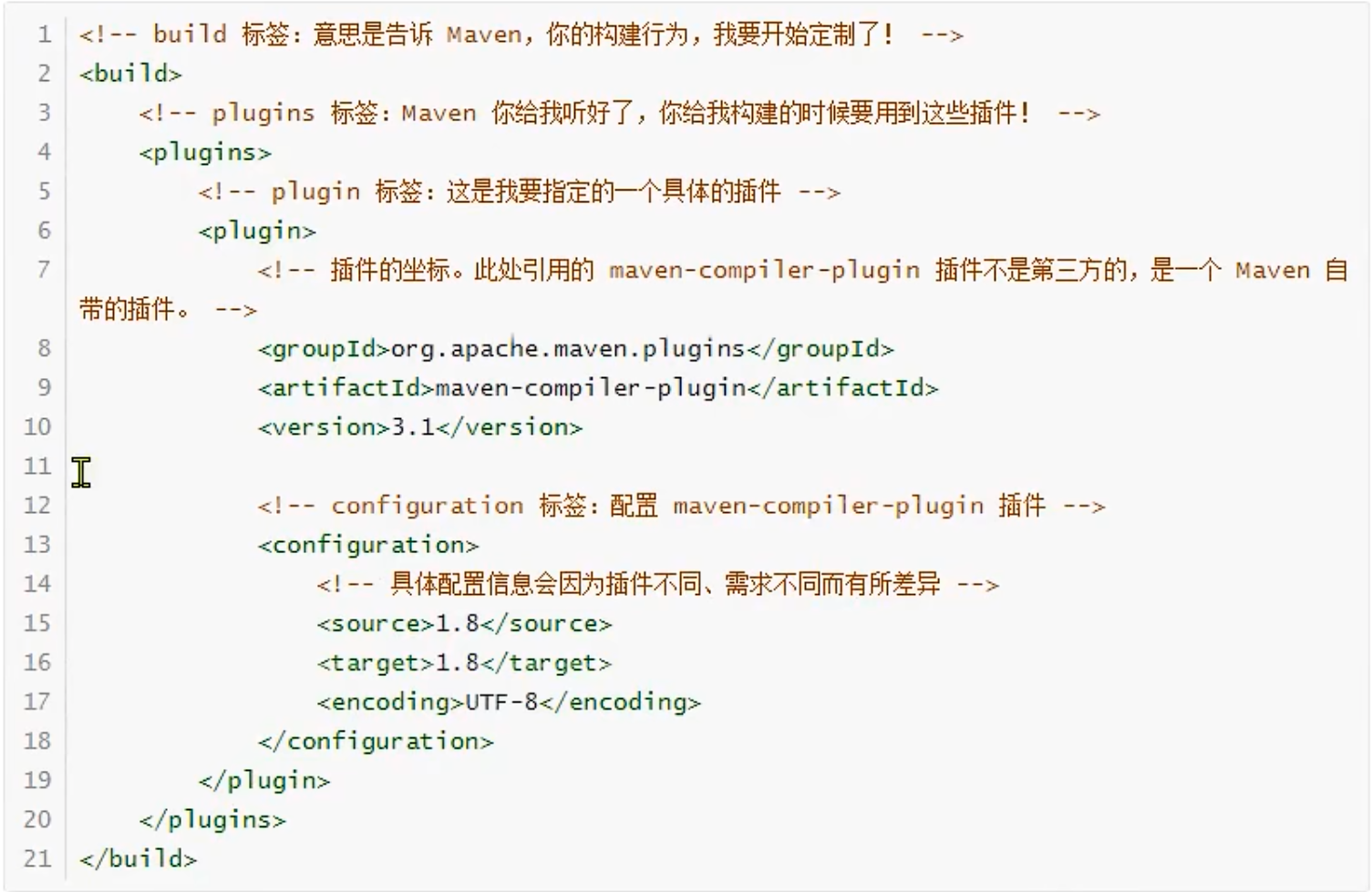
source标签和target标签
- Idea读取的是maven的settings.xml种jdk的版本进行编译的执行。
- 在settings.xml中的profile配置的jdk版本,注释掉。则IDEA无法正常调用指定版本的jdk编译器,编译程序。
- 在plugins能够通过指定jdk的版本,实现当前步骤的正常编译。
- source的配置就是指定的版本。java编译的时候的source参数
- target是调用编译器时指定的。java编译的时候target参数。
- 在settings.xml中配置jdk版本:尽在本地剩下,如果驼鹿当前settings。xml能够覆盖的范围,则无法生效
- 在当前maven工程的pom.xml种配置:无论在哪个环境执行编译等构建操作都有效。
springboot定制化打包
- Spring-boot-maven-plugin,用来改变maven默认的构建行为。具体来说就是改变打包的行为。
- 默认情况下maven调用maven-jar-plugin插件的jar目标,生成普通的jar
- 普通jar没办法通过java -jar xxx.jar命令启动运行,
- 但是Springboot的设计理念就是每一个微服务导出一个jar包。这个jar包可以使用jar -jar命令直接启动。例如需要web的时候,就需要讲tomcat等插件打包到一起。
- 使用方式,配置Spring-boot-maven-plugin插件。即可使用springboot的打包方式进行打包。
1
2
3
4
5
6
7
8
9
| <build>
<plugins>
<plugin>
<groupId>org.springframework.boot</groupId>
<artifactId>spring-boot-maven-plugin</artifactId>
<version>2.6.2</version>
</plugin>
</plugins>
</build>
|
插件提供了6个maven goal
- build-info:生成项目的构建信息文件 build-info.properties
- help:用于展示spring-boot-maven-plugin的帮助信息。使用命令行mvn spring-boot:help -Ddetail=true -Dgoal=可展示goal的参数描述信息。
- repackage:可生成可执行的jar包或war包。插件的核心goal。
- run:运行 Spring Boot 应用
- start:在集成测试阶段,控制生命周期
- stop:在集成测试阶段,控制生命周期
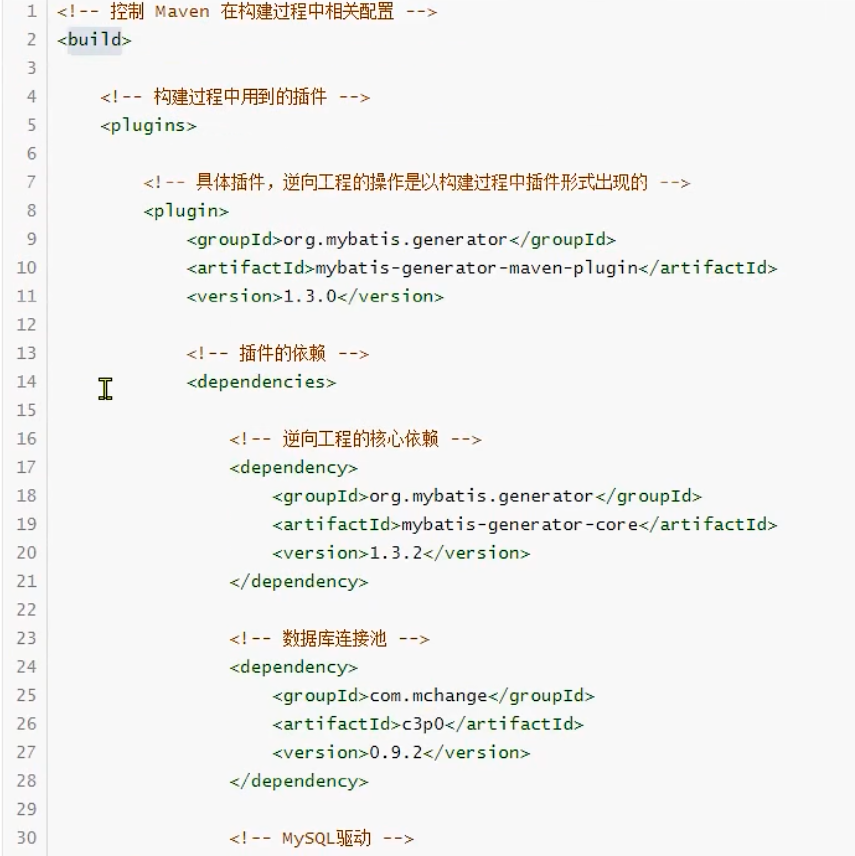
mybatis的逆向工程
插件也可以有自己的依赖。
resources
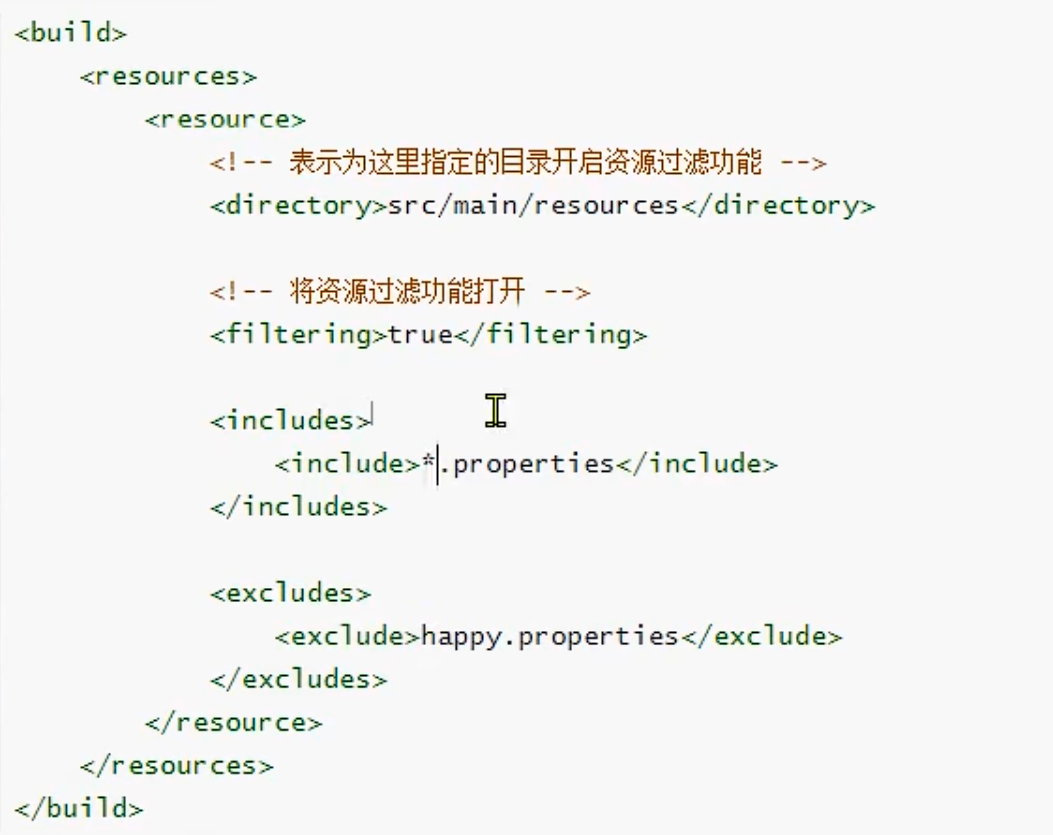
resource可以配置资源过滤
- directory指定资源过滤的目录
- filtering是否打开资源过滤
- include 包含资源过滤的文件
- exclude 排除资源过滤的文件。不会被打包的target目标文件夹当中。
总结
maven的POM中的一些内容。





